


When I was diagnosed with ADHD as an adult, everything clicked. The constant tab-switching, the ideas vanishing like smoke, and notebooks filled with brilliant thoughts that never saw the light of day—all made sense. It was like realizing my brain was a browser with 47 tabs open, each playing its own tune.
Sound familiar?
I learned that ADHD brains aren't broken—they're just wired differently. We don't need to “fix” ourselves; we need systems that work with our brains instead of against them.
Enter Obsidian—the note-taking app that changed my life and might just change yours too.
The External Brain You've Always Needed
For the ADHD mind, traditional note-taking apps are like trying to organize a hurricane with a paper folder. Linear systems fail because our thoughts aren't linear. We jump between ideas at lightning speed—chaotic to others but perfectly natural to us.
Obsidian isn't just another app; it's an “external brain” that mirrors how your ADHD mind actually works. Instead of forcing your thoughts into rigid categories, it uses a network of connected notes—a knowledge graph that visualizes how your ideas relate. This Personal Knowledge Management system (PKM) is perfect for an ADHD brain that thrives on connections over strict categories.
Why Your ADHD Brain Will Actually Stick With This System
Let's be honest: we've all downloaded productivity apps, used them for three days, then abandoned them faster than that hobby we were absolutely, definitely going to stick with this time. How do I know this? Because that person is also me.
(In no particular order: Roam Research, Logseq, Mem, Amplenote. I also had a couple of false starts with Obsidian before really sticking to the platform.)
Here's why Obsidian is different:
1. It Creates Dopamine, Not Dread
The ADHD brain runs on dopamine, and Obsidian delivers it in spades:
Instant gratification: See your knowledge network grow visually with each note
Discover surprising connections: Watch as Obsidian reveals links between ideas you never consciously connected
Low friction: Capture thoughts without deciding where they "belong" first
Sometimes the need for dopamine is so basic and shameless that my brain will decide that today, and only today, it wants the visual appeal of a different theme with its own font and color scheme. Temporarily changing the themes so my notes look like early-2000s era rave fliers is enough to satiate my ADHD need for the day.
There's also the knowledge graph—a beautiful constellation of my thoughts I posted a couple of weeks ago, each note being a dot in this crazy ass supernova of thought patterns:
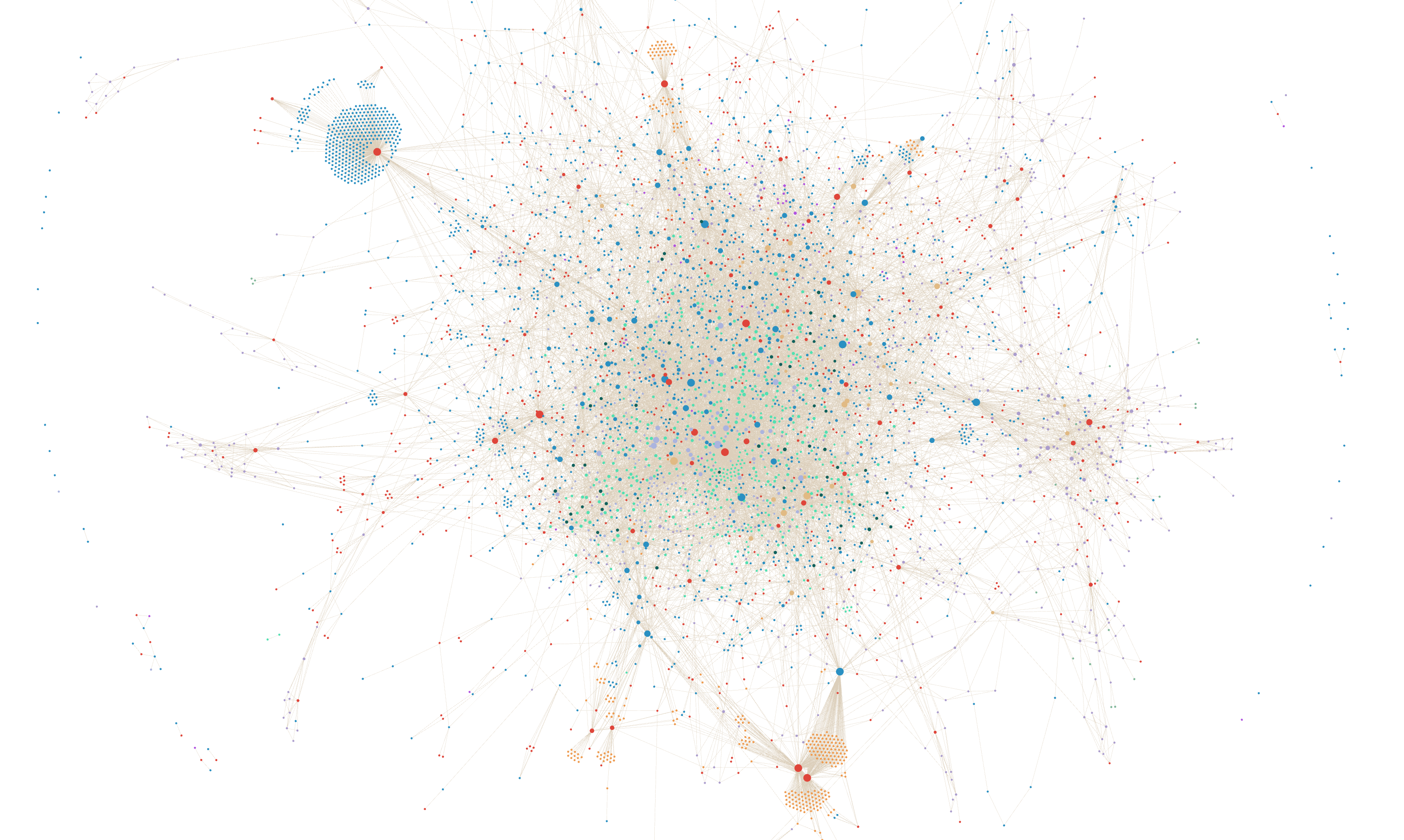
Many people on Reddit insist that it's the most "useless" part of Obsidian. I'm a bit more pragmatic and like to think that it's a simple way to show chaos— my thoughts, after all, are chaotic. Those bright green dots are all the daily journals I've written over the past couple of years. The cyan ones surrounding the red dot are bookmarked external links I've all given the same hashtag for a now defunct plugin.
2. It Works However Your Brain Works Today
Some days I can meticulously organize information. Other days, typing a coherent sentence feels like climbing Everest.
Obsidian adapts to both states:
Bad brain day? Just dump thoughts into a daily note without structure
Hyperfocus activated? Create detailed notes with tags, links, and beautiful formatting
Somewhere in between? That works too
Okay, I kinda want my notes to have that theme where it's lime green text on a black background and I know it's really petty but something inside my brain will click and make sense if you turn it on and jesus, can you just do me this one little thing for me, please? Okay, like, whatever. You do you.
The system grows with you without demanding perfection or consistency—qualities the ADHD brain rarely supplies on demand.
Getting Started Without Getting Overwhelmed
The biggest mistake ADHD folks make with any system is trying to build Rome in a day, getting overwhelmed, and then abandoning it entirely. The second biggest mistake is looking at Reddit or YouTube content creators, seeing their beautiful systems, getting overwhelmed, and then abandoning it entirely.
Seriously, let's not do either of those. Here's your minimalist start:
Step 1: Install and Create One Daily Note
Download Obsidian, and create one daily note.
That's it. Write whatever comes to mind.
Don't worry about:
Perfect organization
Tags
Complicated plugins
“Doing it right” according to some content creator
Just write something—anything—and see how it feels.
Step 2: Add Links When Connections Naturally Arise
When you mention a concept that feels important and you think you could see yourself going down a rabbit hole, put double brackets around it: [[concept]]. This creates a new note automatically.
For example, if you write “I should research [[ADHD and exercise]],” Obsidian creates a new note called “ADHD and exercise” that you can fill in later when inspiration strikes. You can even take a look at it in your knowledge graph, where it will appear as a node with a slightly different color.
Step 3: Build Gradually, Based on Actual Use
After a few weeks of just capturing thoughts, patterns will emerge naturally. That's when you can start creating structure based on how you actually use the system, not how you think you should. For example, it was only after collecting my 30th AI prompt that I thought, “hey, maybe I should have a way to organize AI Prompts.”
Remember: the perfect system is the one you'll actually use.
Beyond Basic: Power Features for When You're Ready
Once the habit sticks, here are some ADHD-friendly features to explore:
Templates for Repeating Thoughts
Create templates for common note types. I have templates for:
Meeting notes
Book highlights
Project ideas
People I've met
"I'm overwhelmed" brain dumps
This removes the activation energy needed to start writing.
Backlinks: See What Led You Here
The backlinks feature shows all notes that link to your current note—perfect for retracing your steps when you inevitably forget how you got to a particular idea.
Daily Notes as Home Base
Daily notes serve as a low-pressure home for random thoughts. When I first tinkered with Obsidian, I used Daily Notes as a diary and as a junk drawer, which was searchable and connected to everything else. As time went on, I changed my workflow so that my junk drawer was less of a daily note and more like an inbox file directory that I named the not-at-all confusing "+."
Real Talk: This Isn't About Productivity Porn
Let me be clear: the goal isn't to become some superhuman productivity machine. It's about reducing the mental load that comes from trying to keep everything in your head.
With ADHD, we're already fighting an executive function battle every day. Obsidian doesn't eliminate that battle, but it does give us better weapons.
My personal win wasn't creating some elaborate system—it was finally having a place where ideas don't disappear. Where I can think, “Didn't I have a thought about this last month?” and actually find it.
Start Simple, Stay Curious
The beauty of Obsidian for the ADHD brain isn't that it forces discipline—it's that it rewards curiosity. Each note, each connection, builds a system unique to your thinking pattern.
Will it solve all your ADHD challenges? No magical app can do that. But having an external brain that works with your natural thought patterns instead of against them? That's life-changing.
And unlike those 17 other productivity systems you've tried, this one might actually stick.
P.S. Have you tried Obsidian or another note-taking system with your ADHD brain? Reply to this newsletter and let me know what's working for you—no perfect systems required!
Thank you for this! I was so overwhelmed by it (where to start?) that this is giving me the little nudge I need.
you should be on sublime.app!!
it's a dream for those of us with ADHD!